


I usually approach storage-cleaner apps with some hesitation. They often feel useful during the first few minutes, then become another icon I forget about. After spending time with ProCleaner from Appsiko, I found its appeal easy to understand: it is a free Tools app built around a very simple promise—helping you remove cache and reclaim space without making the process feel like a technical project. That simplicity is its strongest quality, but it also raises an important question: does it deserve a permanent place on your phone once the initial cleanup is over?
My answer is cautiously positive. It is most useful for people who want a quick, approachable way to check for removable clutter, especially when their phone is running short on storage. It is less convincing as a constantly active “must-have” utility for someone who already manages storage through Android’s built-in tools. The difference comes down to habit. A cleaner can be valuable when it fits naturally into a monthly routine, but it becomes unnecessary if it only encourages repeated tapping without solving the real cause of a full phone.
What the first week feels like
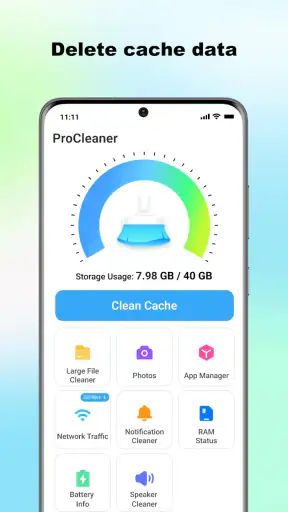
The first impression is shaped by how little effort the app asks from you. The store summary presents it as a one-tap cleaner, and that focus is clear: ProCleaner is aimed at people who do not want to browse through individual app settings, inspect folders, or learn the difference between temporary files and personal content. You open it when storage feels tight, look for the cleanup action, and let the app guide the process.
That makes it particularly approachable for a family member who is uncomfortable with Android maintenance. Instead of explaining where each app stores its cache, I could describe the process in ordinary terms: open the cleaner, review what it identifies, and use the available cleanup control when the result looks sensible. This is not a replacement for understanding your phone, but it lowers the barrier to doing something useful.
During the first week, the strongest benefit is psychological as much as practical. A phone that constantly warns about limited storage can make every download or photo feel risky. Having a dedicated place to start a cleanup gives the problem a clear shape. Even when the reclaimed space is modest, the process feels more manageable than searching through menus one application at a time.
That said, I would not treat a one-tap label as permission to skip judgment. Cache is generally temporary material, but a storage tool still deserves a quick look before you confirm anything. If you are about to travel, record an important video, or install a large update, it is worth checking the result rather than tapping automatically. The convenience is real, but convenience works best when paired with a few seconds of attention.
Who gets the quickest benefit
ProCleaner makes the most sense for people with busy phones: users who install many apps, stream media, take frequent pictures, or rarely open Android’s storage settings. It can also help someone who has inherited an older handset and wants a straightforward maintenance starting point. The app’s Everyone age rating supports that broad accessibility, and its free price removes the need to decide whether a trial is worth paying for.
It is also a practical emergency tool. Imagine preparing for a weekend away and discovering that your phone cannot save another video. Instead of deleting personal files immediately, you can first check whether temporary material is taking up useful room. That workflow matters because it protects the things you actually care about: photos, messages, downloaded documents, and offline content. A cleaner should be the first inspection, not an excuse to erase blindly.
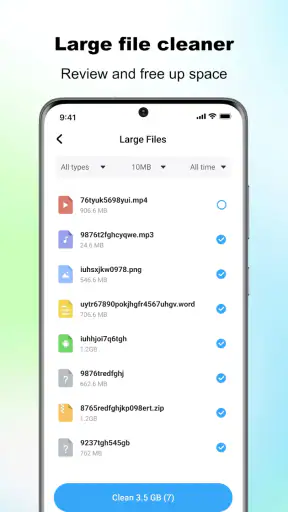
People who already know exactly which large files they want to remove may get less from it. If your problem is a collection of long videos, duplicate photographs, or downloaded films, cache cleaning will not address the main issue. In that situation, a file manager or the phone’s storage screen is usually the better tool because it lets you make deliberate decisions about personal content.
What makes the app feel approachable
The design idea behind ProCleaner is easy to grasp because it avoids turning maintenance into a lesson about file systems. That is important for casual users. Many Android utilities present several categories, warnings, and technical labels before you can do anything. A focused cleaner can feel calmer, particularly when the user only wants to clear temporary clutter and get back to normal phone use.
My advice is to use the first session as a learning session rather than a race. Notice what the app considers removable, observe how the phone behaves afterward, and decide whether the result was meaningful to you. This creates a personal baseline without relying on exaggerated expectations. If you regularly see useful temporary buildup, the app may earn a recurring role. If every scan produces little of interest, its value will probably fade quickly.
The current version is 1.2.1, and the app supports Android 7.0 and later. That broad compatibility is helpful for people keeping an older device in service, although it also means the experience may be shaped by differences between Android versions and manufacturers. Menus, storage behavior, and system restrictions can vary considerably across phones. I would judge the app by how clearly it communicates on your particular handset rather than assuming every Android device will behave identically.
Does it remain useful from month to month?
The long-term case for a cleaner is not that your phone needs constant attention. It is that occasional maintenance can prevent a small storage problem from becoming an urgent one. I would use ProCleaner as a checkpoint, perhaps when installing a large app, before a trip, or when the system starts behaving as though storage is becoming constrained. That rhythm is more sensible than opening it several times a day.
A monthly routine can work well for people who tend to postpone housekeeping. I would begin by checking available storage, run the cleanup, and then look at what still occupies the most room. The second step is crucial. If the phone remains full, the answer is probably not “clean again”; it is likely that personal media, downloads, or app installations are responsible. ProCleaner is most valuable when it helps separate temporary clutter from the larger storage decision.
That distinction is one of the app’s less obvious strengths as a habit tool. A simple cleanup action can act as a prompt to inspect your storage more thoughtfully. After using it, I am more likely to notice whether a messaging app has accumulated media, whether a podcast folder is growing, or whether an old game is still installed for no reason. The cleaner does not need to solve every category to be useful; it can start a better maintenance conversation with yourself.
There is also a trade-off between convenience and control. Android’s built-in storage tools are usually closer to the operating system and may offer more context about large files, unused apps, or category sizes. ProCleaner is easier to approach when your goal is temporary cleanup, but the system tools can be better when you need a complete inventory. I would keep both available rather than treating one as a universal replacement for the other.
A routine that avoids pointless cleaning
My preferred workflow is deliberately short. First, check whether the phone is actually low on space. Second, run ProCleaner and read the cleanup result instead of treating the button as a reflex. Third, use Android’s storage view if the phone still feels crowded. Finally, remove one or two clearly unnecessary items, such as an old download or an app you no longer use. This turns the cleaner into one step in a maintenance routine rather than the entire routine.
Another useful habit is to clean before a predictable storage-heavy task, not after the phone has already failed to save something. Before a trip, an operating-system update, or a day of recording, I would rather create breathing room early. Temporary files are only one source of pressure, but clearing them first is less disruptive than immediately reviewing irreplaceable content.
I would also avoid assuming that a larger cleanup result automatically means a better result. Temporary data can return because apps need it for normal operation. A repeated buildup is not necessarily a malfunction; it may simply reflect how you use streaming, browsing, social, or productivity apps. If ProCleaner becomes a daily ritual without improving your available space for meaningful periods, the habit is costing attention without delivering enough value.
Where the maintenance burden appears
The app is designed to reduce maintenance work, but no cleaner can remove every responsibility. You still need to understand what you are about to clear, decide whether the returned space matters, and investigate persistent storage pressure. That is a small burden, yet it becomes noticeable if the app repeatedly asks for attention without producing a visible difference.
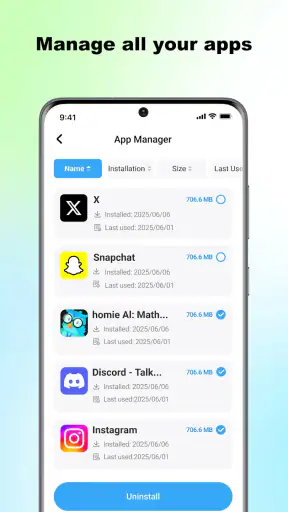
There is also a mental burden common to one-tap utilities: the temptation to believe that one action has completed the whole job. ProCleaner can make cache cleanup easier, but it should not replace backups, photo organization, download management, or uninstalling unused apps. If your phone is full because of personal files, the cleaner may offer reassurance without addressing the actual problem.
I found the best way to keep that burden low was to give the app a specific job. I would not open it simply because I had nothing else to do. I would open it when the storage indicator suggested a reason, or when I was preparing for a task that needed free space. That rule prevents the utility from becoming another source of notifications or routine checking in my own mind.
For less technical users, the main maintenance question is whether the app’s result is understandable. A good cleanup experience should leave you knowing what kind of clutter was addressed and whether you should continue looking elsewhere. If the screen gives you enough context to make that decision, the simplicity works in your favor. If you only see a reassuring action with no meaningful explanation, I would rely more heavily on Android’s own storage categories before deleting anything.
When Android’s own tools are the better choice
The built-in alternative usually wins when you need precision. If I want to locate the largest videos, review downloaded files, remove an unused application, or understand why a particular category is growing, I prefer the system storage interface or a reputable file manager. Those tools are slower in some situations, but they provide the detailed view needed for careful decisions.
ProCleaner is better suited to the narrow, repetitive task of checking temporary clutter without navigating through several settings pages. That makes it complementary rather than automatically superior. I would recommend it to someone who values a simple front door into storage maintenance. I would not recommend relying on it alone if storage management is already a regular technical task for you.
The app’s reach suggests that this straightforward approach resonates with many Android users: it has passed five million installs and holds a 4.1 average from around 8.9 thousand ratings, with 350 written reviews. Those figures do not guarantee that it will behave identically on every device, but they do show that it is not an obscure experiment with no established audience. I still place more weight on whether its cleanup results are useful on my phone than on popularity alone.
What can cause fatigue after the novelty fades?
The first source of fatigue is repetition. Cache is temporary by nature, so it can return after normal app use. If you expect one cleanup to provide a permanent storage solution, the app may disappoint. The more realistic expectation is a modest reset that can be repeated when needed. Once that becomes clear, the experience feels less like a dramatic fix and more like ordinary housekeeping.
The second source is uncertainty. Storage cleaners operate near personal data, and even a simple interface can make users nervous if they are not sure what will happen next. My practical rule is to pause whenever a cleanup result seems surprising. If the app identifies an unusually large amount of material, I would compare that with Android’s own storage information before proceeding. A cautious pause is not a failure of convenience; it is sensible protection for your files.
The third source is diminishing returns. On a phone with plenty of free room, clearing cache may have little day-to-day impact. In that case, ProCleaner can feel like a solution looking for a problem. I would skip it or use it only occasionally rather than turning it into a permanent ritual. Tools earn lasting space by saving time or preventing trouble, not merely by existing.
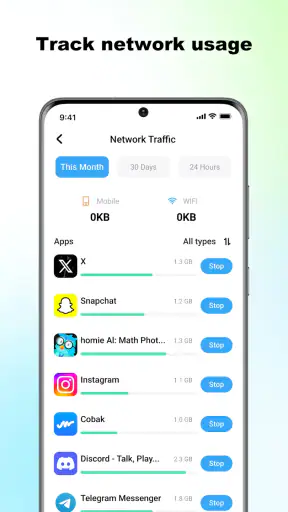
There is also the possibility that a user wants more than this app’s focused purpose. Someone looking for duplicate-photo detection, detailed file categorization, battery monitoring, or broad device optimization should compare other tools carefully. Adding unrelated functions can make an app more complicated, but a focused cache cleaner will not satisfy every maintenance need. Choosing the narrower tool is sensible only when its narrowness matches your actual problem.
Three practical lessons I would keep
- Use it before deleting personal files. A cache check is a lower-risk first move when you need room quickly, especially before recording or downloading something important.
- Measure the problem after cleaning. If the phone still feels full, stop repeating the same action and inspect large personal files or unused apps through the system tools.
- Make it a checkpoint, not a compulsion. A monthly or situation-based routine is more useful than constant scanning, because temporary data naturally returns.
These habits also answer a common concern: whether a cleaner can make a phone permanently faster. I would be careful with that expectation. Removing unnecessary temporary material may relieve storage pressure, but it does not transform an older handset into a new one. If sluggishness comes from limited hardware, a demanding app, a system issue, or a nearly full photo library, the right solution may lie elsewhere.
My lasting verdict on ProCleaner
After the initial novelty fades, ProCleaner earns its place only if you genuinely want a simple cache-cleaning checkpoint. Its free access, broad Android compatibility, Everyone rating, and focused purpose make it approachable for ordinary users who would otherwise ignore storage maintenance. Appsiko has kept the central idea easy to understand, and that is valuable when the alternative is leaving a phone cluttered because the system menus feel intimidating.
I would recommend it to someone who wants a quick first step, owns an older Android phone, or regularly runs into storage warnings but does not want to become a file-management expert. I would also suggest it to families who need a less technical way to begin discussing safe cleanup. In those situations, the app can save time and reduce the panic that often leads people to delete the wrong things.
I would skip it if you already use Android’s storage controls confidently, keep your phone well organized, or expect advanced file analysis. It is also not the right answer for a phone filled mainly with photos, videos, downloads, or applications you no longer use. Those problems require decisions about personal content, and a one-tap cache cleaner cannot make those decisions for you.
My final view is that ProCleaner is best understood as a small maintenance aid, not a permanent cure for storage problems. I would keep it installed on a phone where it regularly saves me from navigating menus, but I would remove it from a phone where every cleanup produces little benefit. Its lasting value comes from disciplined use, not repeated tapping. Used as the first step in a sensible storage routine, it is a useful and friendly Tools app; used as the only answer to every storage warning, it will eventually feel limited.


